ZxNextTransfer
A downloadable tool
Copy files between two Spectrum Nexts (or clones) over Wi‑Fi — no PC, no setup. ZX Next Transfer is a native .nex application that boots already listening on the Next's own ESP Wi‑Fi module. When another Next dials in, the dual‑pane Explorer opens by itself; to reach a machine yourself, pick it from the list and press ENTER. The other machine can be a second Next, or a PC running ZX‑Next‑Unite.
ZX Next Transfer is the quick way into ZX Next Remote: the same Explorer, file server, CRC‑verified copies, OS protection and settings, with the menu replaced by one list of machines. It speaks the NextSync protocol (based on Jari Komppa's NextSync, with ZX‑Next‑Unite's extensions), so the other Next can run ZX Next Transfer, ZX Next Remote or the .sync5 dot command.
Already own ZX Next Remote? Then you already have ZX Next Transfer: it ships inside every ZX Next Remote download since 1.6.0, as zxnextremote-zxnt.nex, at no extra cost.
Key Features
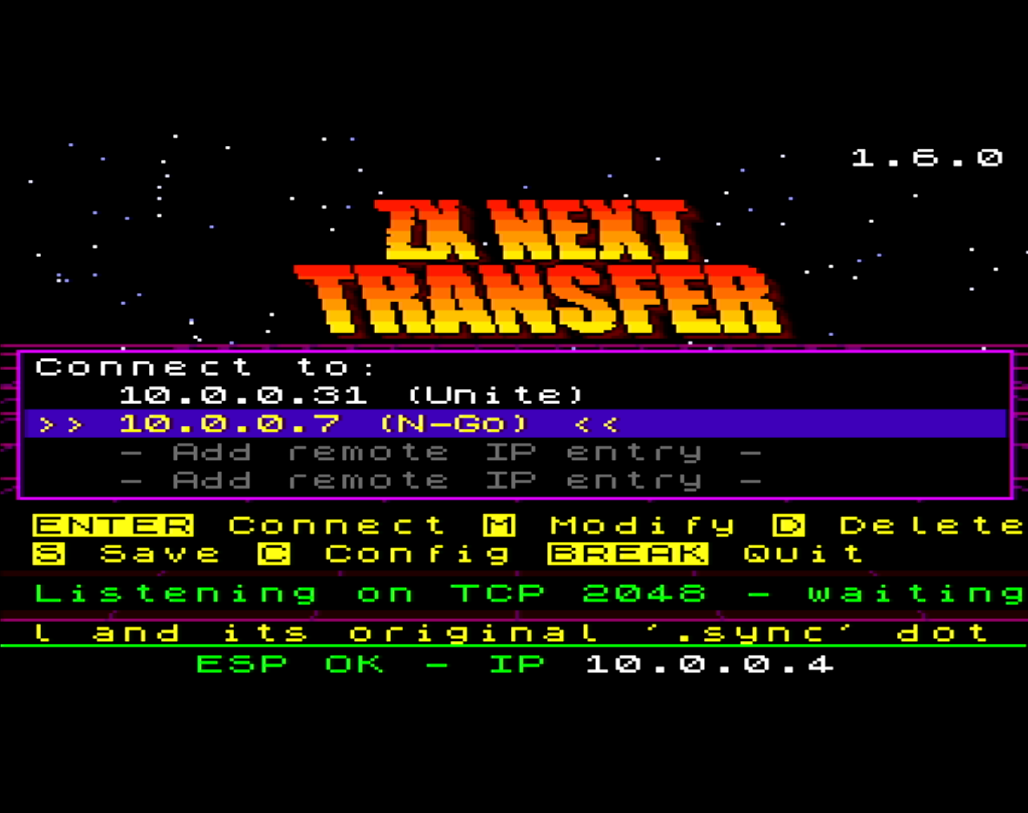
- Nothing to set up: as soon as the Wi‑Fi module has an address, ZX Next Transfer listens on TCP port 2048, and its bottom line shows this Next's IP address, the one to type on the other end
- The Explorer opens by itself when another Next dials in; leave it, and the landing screen listens again
- ENTER connects out: the landing lists up to four saved machines, by name and IP. ENTER on one connects to it and serves this Next's SD card to it; when that session ends, the landing comes back
- A new machine is one octet away: ENTER on an empty row opens the IP editor already filled with this Next's own network (
192.168.1.), then asks for a nickname of up to 10 characters - A handful of keys: arrows or
q/amove, ENTER connects,Mmodifies,Ddeletes (press it twice),Ssaves,Copens Settings, BREAK quits - Explore this Next's own SD card with
E, no Wi‑Fi needed (new in 1.6.1). While you browse, the landing is not listening; leave the Explorer and it listens again - Kempston mouse, on by default: click a row to select it, click it again to connect; the words in the help lines are buttons too
- Dual‑pane Explorer: this Next's SD card and the other machine's, split or one at a time. Copy files and folders both ways, rename, erase (a folder with everything in it), make folders and switch drives, from the keyboard or a right‑click menu
- Safe copies: NextSync checksums every block and re‑sends a damaged one; each file is then CRC‑32 checked as it lands, and a copy that fails is deleted and copied again, up to three more times
- Copies that survive a Wi‑Fi drop: with Settings → Sessions Off, the default here, a paste waits up to 2.5 minutes for the other Next to reconnect and resumes at the file it was on. A Next serving its card with ZX Next Transfer or ZX Next Remote redials by itself
- Stop a long folder copy with BREAK: it stops between two files, so nothing is left half‑written
- Built‑in OS protection for the Next's system folders (apps, dot, sys, nextzxos…) and firmware files: Off, Write (read‑only) or Read+write (the default: no reading or writing), against remote machines and your own Explorer alike
- Three UART speeds: Slow (the default), Medium and Fast. With hardware flow control on the KS2 (issue 4/5 boards), NextSync can run at Fast
- An animated ZX NEXT TRANSFER logo in a sky of twinkling stars, on a dark theme. Without the art file, the same screen in plain text
- Includes a complete PDF user manual
Additional Capabilities
- Shares ZX Next Remote's settings: the same settings file (c:/sys/config/zxnextremote.cfg) and the same saved machines, so the two can sit on one card. Settings → Machines holds six; the landing shows the first four
- Remembers the machine you last connected to, and starts the cursor there next time
- Multiple drives: declare up to 8 letters (C to P) in Settings → Drives; C (the SD card) and M (the NextZXOS RAM disk) by default, and the remote pane offers the far Next's own drives
- Explorer view modes: Classic (8 rows), Compact (12) and Dense (14, the default)
- Long filenames (up to 249 characters), folders listed first, A to Z, 256 entries per page
- Network‑activity border flash, the
.sync5dot's own signal (on by default, "Net flash" in Settings) - Over‑the‑air updates from ZX‑Next‑Unite 9.7.49 or later, with a ZX Next Remote package: see Updating, below
- Works in MAME: launch it from ZX‑Next‑Unite with its "RS232 ESP Emulation (Mame)" setting on, and keep the UART speed on "Slow"
What you need
- A Spectrum Next (or clone) with its ESP Wi‑Fi module, already joined to your local network with NextZXOS's own Wi‑Fi setup. ZX Next Transfer doesn't set up Wi‑Fi.
- On the other end, on the same network: a second Next running ZX Next Transfer, ZX Next Remote or the
.sync5dot command, or a PC running ZX‑Next‑Unite. - On a KS1 or an N‑GO, set Settings → UART speed to Medium rather than Fast (see Known Limitations).
Known Limitations
- Built for one machine at a time. Settings → Sessions is Off by default here, which is what lets a copy survive a Wi‑Fi drop. ZX Next Remote adds a menu, up to four Nexts at once, and a route through a PC running ZX‑Next‑Unite's HTTP bridge.
- Two machines pressing ENTER on each other at the same moment both fail: each stops listening before it dials. Let one go back to its landing screen (it listens again at once), and press ENTER again on the other.
- Wi‑Fi link drops. During long or busy transfer sessions the ESP Wi‑Fi link can occasionally drop. First, lower Settings → UART speed on the machine that lost the link, and keep Settings → Sessions Off, so a copy waits for the other Next and resumes.
- Large files. Large files are uncommon on the Next.
- Files over 10 MB may not transfer reliably based on current testing.
- Verify CRC's default checks files up to 3.5 MB. Bigger files are copied, but not checked.
- CRC checks need a recent far side: a
.sync5dot v5.9.2 or later, or ZX Next Remote 1.0.8 or later (every ZX Next Transfer qualifies). With an older one, set Verify CRC to Off.
- Which boards have ESP hardware flow control
- KS1 (the first Kickstarter Next), issue 2: No, the wires do not exist
- N‑GO, issue 2 design: No, the wires do not exist
- KS2 (Plus and Accelerated), issue 4: Yes
- KS3 (issue 5 boards): Yes (pending validation)
- On a KS1 or an N‑GO, flow control is not switched off, it is absent, and nothing can turn it on. Use UART speed Medium (or Slow) there; Fast is not reliable. Received files run at Slow on these boards.
- Speed and keys while it runs. ZX Next Transfer runs your Next at 28 MHz and switches off F8 while it runs. Quitting resets the machine, so it comes back at 3.5 MHz unless your autoexec sets a speed.
- Local network only. Nothing is encrypted and NextSync has no authentication. Never expose a Next, or the PC running ZX‑Next‑Unite, directly to the internet.
What's in the download
- zxnextremote-zxnt.nex: ZX Next Transfer itself. The name is the ZX Next Remote family's on purpose: keep it, because ZX‑Next‑Unite's updater looks for that name.
- zxntmenu0.nxi: the artwork for the landing screen. Optional: copy it into the same folder as the .nex (or a
gfxfolder next to it), without renaming it. Without it, the landing draws its list, help and status on a plain black screen, with no logo. - ZXNextRemote-Manual.pdf: the full manual. ZX Next Transfer has its own section; the rest covers the Explorer, every setting, network ports and firewalls, security, hardware flow control and troubleshooting, and explains the on‑screen messages.
- THIRD-PARTY-NOTICES.md: credits and licences for the work ZX Next Transfer builds on.
- deploypak.txt: the list of files that go with the .nex. You don't need to open it.
Installing
- Join the Next to your Wi‑Fi network with NextZXOS's own Wi‑Fi setup. ZX Next Transfer doesn't set up Wi‑Fi.
- Copy the files. Put
zxnextremote-zxnt.nexinto a folder on the SD card, withzxntmenu0.nxibeside it.c:/homeis a good choice. Keep the .nex out of the system folders (apps, dot, sys…), which OS protection guards. - Launch it from the NextZXOS Browser. It listens as soon as the Wi‑Fi module has an address; the bottom line shows that address.
- Set up the other end.
- Another Next running ZX Next Transfer: nothing to set up. Add it as a machine on one of the two Nexts and press ENTER there.
- A Next running ZX Next Remote: either run its NextSync (Listener) with its NextSync controller IP set to this Next's address, or pick its NextSync (Controller) and press ENTER here on its row.
- A Next with just the
.sync5dot command: it's thesync5file in every ZX‑Next‑Unite release; put it inc:/dot, save this Next's address once with.sync5 <IP>, then run.sync5 -L. - A PC: run ZX‑Next‑Unite with its Remote Explorer listen server running, add the PC's address as a machine here and press ENTER. The PC's Remote Explorer then browses this Next's SD card.
Updating
Download the new version from this page and copy its files over the old ones.
ZX‑Next‑Unite 9.7.49 or later can also update a ZX Next Transfer machine over the air: when the machine connects to it (ENTER on the PC's row), Unite sends the new build, verifies it, swaps it in and keeps the old one as a .bak. Unite takes that build only from the ZX Next Remote package it fetches from itch.io, not from this page, so that route needs ZX Next Remote in your itch.io library. Such an update also copies that package's other two binaries and the files that go with them onto the card.
Credits
Wi‑Fi transfer based on NextSync by Jari Komppa (public domain): the NextSync protocol and its original .sync dot command and server are his. With fixes by Robin Verhagen-Guest. Sync4/Sync5 protocol extensions by Julien Clauzel. ESP UART set‑up after original code by D. Rimron‑Soutter. Details are in THIRD-PARTY-NOTICES.md, in the download.
ZX Next Transfer, Copyright © 2026 Julien Clauzel Hi8Bytes.
ZX Spectrum Next is a trademark of SpecNext Ltd - https://www.specnext.com/
Note: ZX Next Transfer is provided as‑is. Support is community‑driven, and any issues or suggestions can be shared on GitHub: https://github.com/jclauzel/ZX-Next-Unite/issues.
While the NextSync protocol includes strong verification and retry mechanisms, remote file operations may still lead to data loss or corruption. ZX Next Transfer carries no warranty, so please keep backups of important files.
Download
Click download now to get access to the following files:
Leave a comment
Log in with itch.io to leave a comment.