QLNextRemote
A downloadable tool
Drive a Spectrum Next from a Sinclair QL, or serve the QL to your PC. It runs on the Next's own QL core or on an emulator such as QPC2 or sQLux. QLNextRemote is a native QDOS job (built with qdos-gcc C, drawn with the QL's own screen driver) that brings the Remote Explorer from ZX‑Next‑Unite and the Explorer of ZXNextRemote onto the QL. Browse, manage, and transfer files between your QL, your Nexts and ZX‑Next‑Unite over Wi‑Fi or your home network with ease.
As a companion tool to ZX‑Next‑Unite, QLNextRemote is powered by the rock‑solid NextSync protocol, including many new updates and improvements, ensuring reliable, verified file transfers. On the Next's QL core it drives the Next's built‑in Wi‑Fi module directly (the ESP8266 behind SER3); on QPC2 and sQLux it uses their TCP_ network device. Either way it connects to ZX‑Next‑Unite servers and to Nexts running the .sync5 dot command (based on Jari Komppa's NextSync).
You get lifetime 1.x version updates, and you can install the tool on all your QLs, Next QL cores and emulators.
Key Features
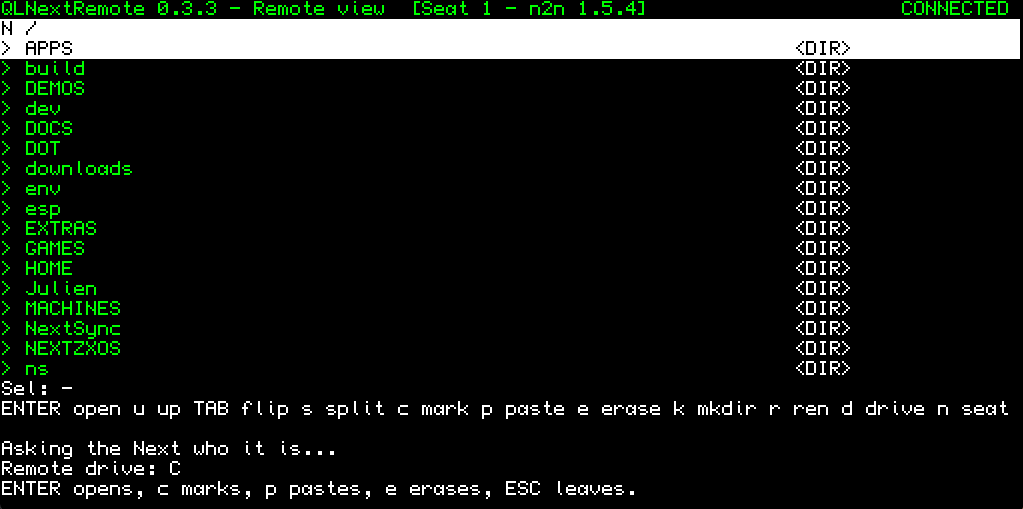
- ZXNextRemote's look on the QL: Home, the Explorer, Settings, the file server and the controller drawn in the QL's eight colours (Graphic 8, the default), in Graphic 4 at 512×256, or in the original 85‑column text, switched from Settings at once
- Graphic 256: every screen in 256 colours, ZXNextRemote's own palette, with ZXNextRemote's jungle picture behind the Home menu. On the Next's QL core it draws through SCN, Simon N Goodwin's free colour driver (a separate download), which the Next's launcher
NEXT_basloads for you; on QPC2 set to High colour (mode 32) it needs no driver at all. QLNextRemote checks the machine first and stays in Graphic 8 where 256 colours aren't available, saying why - Big folders: the Explorer shows up to 4096 entries per pane, sorted (ZXNextRemote on the Next, with 64K, holds 256), pages through them with SHIFT + cursor up/down, either end one ALT + cursor left/right away, erases a folder of any size in one go, and CRC‑checks up to 4096 files of a folder pulled to the QL. Long names on the Next are kept whole, up to 255 characters; folders are walked as deep as QDOS names go, and an erase on a Next reaches 32 folders deep
- Fully keyboard driven (the manual maps the QL's keys onto the Next's keyboard)
- A mouse on the ZX Spectrum Next's QL core and on QPC2: plug a PS/2 mouse into the Next, or on QPC2 just use your mouse, through the Pointer Environment SMSQ/E has built in (no PTR_GEN needed). Point and click on every screen, in every display, Text included. The buttons work the QL way (left selects a row or presses a button and a second click on the row opens it, right acts like ENTER on what's under the pointer) or ZXNextRemote's way (right opens the Copy, Paste, Erase and Mkdir menu in the Explorer). On the Next there are five pointer speeds and the pointer appears once the mouse first moves; on QPC2 the Pointer Environment draws its own arrow and the speed is QPC2's own
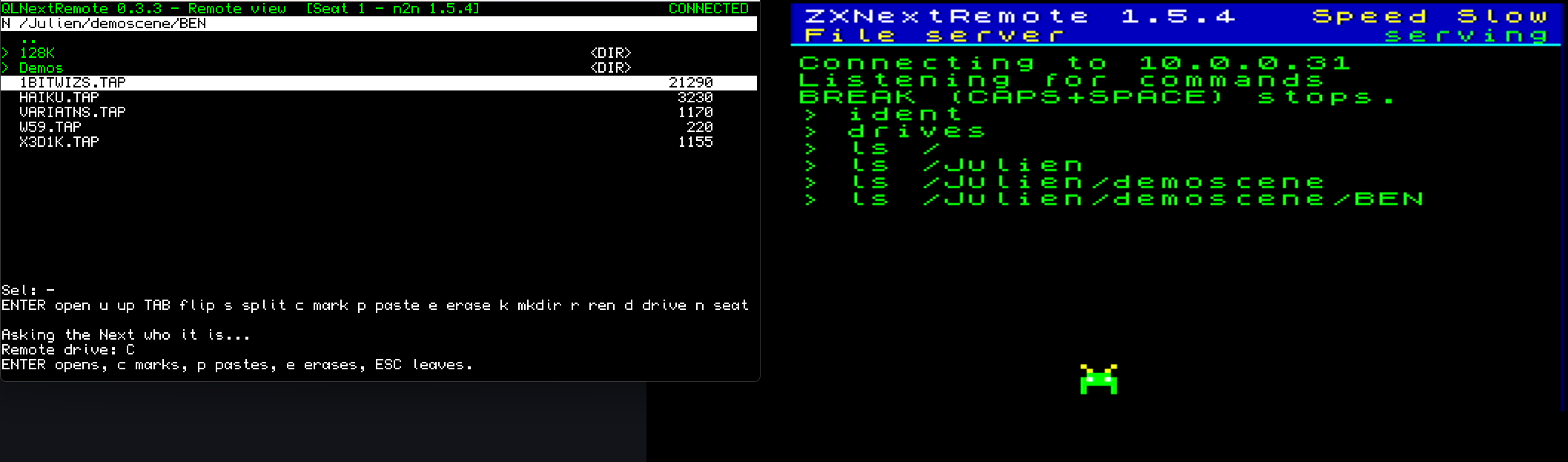
- Turn your QL into a file server "listener": ZX‑Next‑Unite's Remote Explorer browses its drives and copies files both ways
- Control a Next as a "controller" from the QL and transfer files both ways: the Next dials in with
.sync5 -L, no PC required - Seat up to four machines at once and switch between them from the seat picker
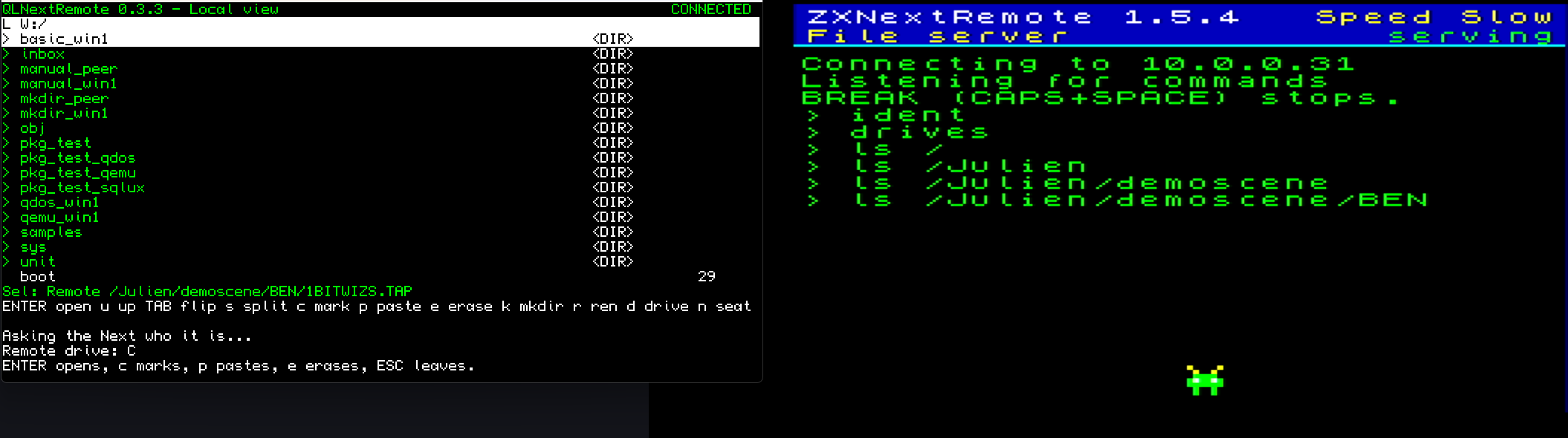
- Choose and flip between split or single‑pane explorer views, in ZXNextRemote's Dense or Classic layout on the Graphic screens
- Two transfer speeds on the Next's QL core (UART/Wi‑Fi): Slow and Medium
- Full file management in both panes: copy and paste in any direction, erase, rename, create directories
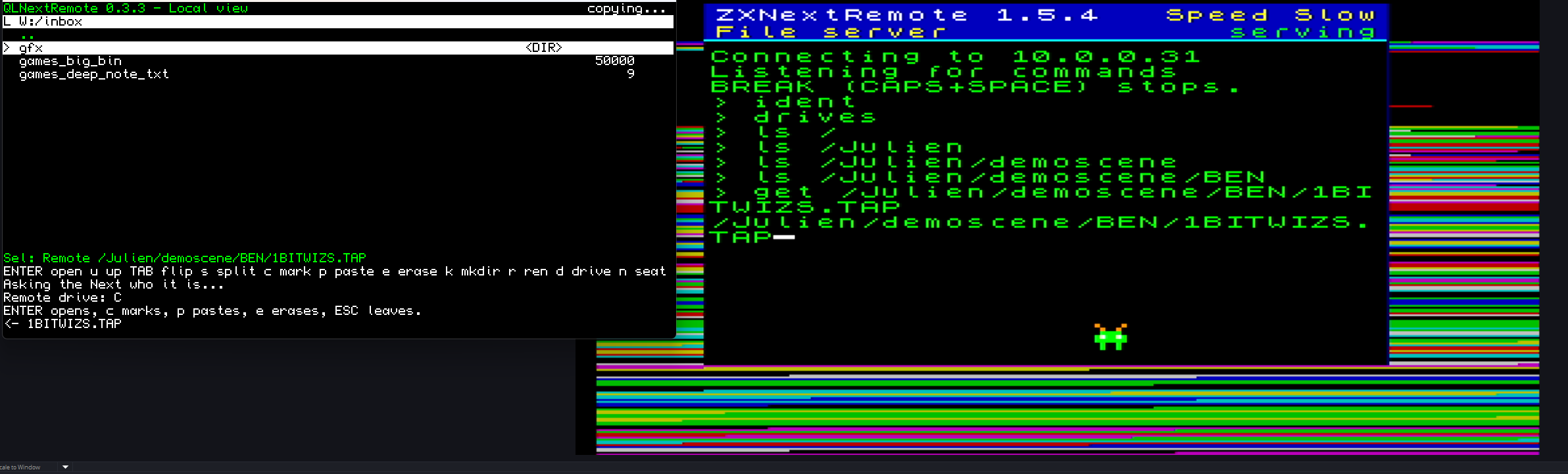
- A progress line on every copy the QL's Explorer makes (percentage, size, speed and time left; the time elapsed for a folder pulled from the Next), and ESC (BREAK on a Next) stops such a copy, even in the middle of a file: the part‑copied file is deleted and the files already copied are kept
- Folder copies between the QL and the other machine, with the tree rebuilt under the destination folder
- Copies on the QL itself: paste between two of the QL's folders in ZX‑Next‑Unite's Remote Explorer and the QL makes the copy, files and whole folders, with nothing crossing the network (a copied job keeps its QDOS header and still runs)
- Recursive folder deletion (asks first)
- Block checksums with automatic resend on every transfer, plus a CRC‑32 check of each file the QL sends or fetches and of each file ZX‑Next‑Unite sends to the QL; a copy that doesn't match is deleted and named in red
- Easy updates via ZX‑Next‑Unite: drop the new zip into its download folder (or let its itch.io check fetch it), and the job in HOME (
win1_HOME_qlnextremote_exe, where every install below puts it) replaces itself and restarts as the new version - Built‑in OS‑level protection for the QL's system files (Off, Write, Read+write), against requests from the network and the QL's own Explorer alike
- Network transport Auto, TCP or ESP: Auto uses the TCP_ device when there is one and the Next's Wi‑Fi module otherwise
- QDOS executables keep their header through ZX‑Next‑Unite: a job fetched from the QL keeps its dataspace on the PC, and one sent back is ready to EXEC
- Multi‑drive support: win1/win2, flp1/flp2, ram1, mdv1/mdv2 (default W and F; only the drives that answer are offered)
- Sessions On/Off: On seats up to four machines; Off keeps a single seat, which whichever machine dials in next takes over
- The Listener dials again on its own when the link drops (up to fifteen tries)
- Includes a complete PDF user manual
- Comes in three forms of the same job:
- sqlux: for the folders the sQLux emulator mounts
- qemulator: the job with its QDOS header inside the file, the form ZX‑Next‑Unite's updater sends
- qdos: the raw job plus SuperBASIC installers, for the Next's QL core, QPC2, a Q68 and native QDOS or SMSQ/E drives
Additional Capabilities
- Local file explorer that needs no network: copy, erase, rename and make folders across the QL's own drives
- Remote automation: while the QL is seated as a listener, ZX‑Next‑Unite's NextSync HTTP bridge (switched on in Unite's Settings) lets a script list, download, upload, copy, CRC‑check, rename and delete on the QL much as on a Next
- "Auto‑start" behavior: choose whether QLNextRemote opens straight into listener mode (file server) or controller mode (driving a Next); the Home menu also offers the last role again for 15 seconds
- Machines list: up to six saved PCs for the Listener to dial
- The Home screen shows the QL's own IP address, the one a Next saves with
.sync5 <ip>to dial the QL's controller: on the Next's QL core from its Wi‑Fi module, and on QPC2 and sQLux from their TCP_ device (on an emulator it's the PC's address, the one a Next dials) - A bigger picture on sQLux: any window size from 1x to 3x, maximised or full screen (F11), shown 4:3 like a QL monitor or with square Graphic 8 pixels. The manual gives the
sqlux.inilines (QLNextRemote always draws 512×256, so a biggerRESOLUTIONonly adds empty desktop around it) - Debug logging, on screen and in a log file: the transport chosen and, on the Next's QL core, the AT commands that bring the Wi‑Fi module up, dial and listen
Known Limitations
- Wi‑Fi link. On the Next's QL core, UART speed Slow (the default) works with every module, and Medium is verified on a KS2. If transfers there are unreliable, go back to Slow. At Medium, quit QLNextRemote with q before leaving the QL core: that puts the module back to 115200 for NextZXOS (after a hard reset it stays at Medium until the Next is power‑cycled). If the link drops, the Listener dials again by itself; if the Wi‑Fi module stops answering, power‑cycle the Next.
- Speed. On the Next's QL core, copies from the QL to the PC measured about 4 KB/s at Slow and 5 KB/s at Medium on a 36 KB file, and about 9 KB/s at Medium on a 663 KB file. Each 1 KB block waits for its acknowledgement, so that round trip sets the pace more than the serial rate does. Fast (2 Mbit) isn't offered: the QL core has no flow control to the Wi‑Fi module and loses bytes at that rate. It can still be set in the settings file for testing, unsupported.
- Large files. Verify CRC defaults to "On 3.5MB", which skips the check on files over 3.5 MB (they are kept, unverified). "On" checks every file, up to 4096 files of a folder copied to the QL.
- Folder sizes. The Explorer holds up to 4096 entries a pane (the log says "Showing 4096 of N entries" above that); a Next lists a whole folder but pulls at most 4000 entries from one folder, its own limit, and its time for a folder pull grows fast with the folder's size (a few hundred entries are fine). In a folder pull the far side cuts each file's path at 200 characters, so a file whose path reaches 200 is skipped and counted; pull such a file on its own and it lands whole.
- Long names. A QL name holds 36 characters, its folders included, so a long name from a Next stays on the Next: a copy to the QL refuses it before writing anything ("Too long for QDOS"), and a folder pull lands the rest and counts what it left. Rename it on the Next first (r in the remote pane). A rename on the Next shares 254 characters between the old and the new path, and the log says how long the new name may be.
- Mouse. sQLux, Q‑emuLator and a real QL get a mouse only if you load PTR_GEN, Marcel Kilgus's Pointer Environment (not included), yourself, as is usual on those machines; QLNextRemote then uses it (tried in sQLux). The Next needs no PTR_GEN: if it is loaded there anyway, QLNextRemote uses it in Text, Graphic 4 and Graphic 8 but not in Graphic 256, where its pointer would draw into the colour picture. On a QPC2 screen bigger than 512×256, keys and clicks reach QLNextRemote while the pointer is over its 512×256 area at the top left.
- Updates. ZX‑Next‑Unite updates the job at
win1_HOME_qlnextremote_exe, where every install below puts it, so always start that copy. A copy started from anywhere else (a Windows folder through QPC2's DOS device, the root of an sQLux folder) can't be replaced by an update. See "Already running it" below. - Folders on the Windows build of sQLux. Stock sQLux 1.1.2 for Windows can't create a folder in a PC folder from any QL program, so folders pulled from a Next land flat there and a folder copied on the QL itself fails (QLNextRemote still renames files, by copying them). That's an emulator bug (Toolkit II doesn't cure it), and QLNextRemote's fix for it has been merged into sQLux: sQLux's current Windows build, the latest download (
sqlux-x86_64-mingw64-latest.zip), includes it and has passed QLNextRemote's folder tests, and the next numbered sQLux release will have it too. With 1.1.2, use QPC2 when folders matter, or create the folder on the PC. The Next's QL core and QPC2 make real folders. On every sQLux build, a folder erased from the QL stays on the PC, empty (sQLux deletes files, not folders): delete it in Windows Explorer. - Hard reset while seated. If the Next's QL core is hard‑reset while seated in ZX‑Next‑Unite, its Wi‑Fi module keeps the connection open. ZX‑Next‑Unite 9.7.45 or later lets go of the silent seat after about two minutes, or within seconds with Disconnect (older versions wait about ten minutes); starting the Listener again also closes the old connection.
- Tested machines. Tested with ZX‑Next‑Unite on the QL core of a KS2 Next (over its Wi‑Fi), on QPC2 and on sQLux; the controller role has run on the KS2's QL core with a Next dialling in, and a ZXNextRemote 1.5.5 controller on a KS2 has driven a QPC2 listener directly over NextSync (listing, copies and new folders both ways). Not yet tested: ZXNextRemote reaching a QL through ZX‑Next‑Unite's HTTP bridge, a second QL at the other end, the QL core on a KS1, a KS3 or an N‑GO, SMSQmulator, and a Q68 with the QoE Ethernet driver. An original QL has no TCP/IP network device yet.
- Local network only. Nothing is encrypted and NextSync has no authentication. Never expose a QL, a Next, or the PC running ZX‑Next‑Unite directly to the internet.
What's in the download
- QLNextRemote-Manual.pdf: the full manual. It covers installing on the Next's QL core, QPC2, sQLux for Windows and a Q68 or other native drive, every menu, explorer view and setting, the Next's key mapping, OS protection, updating from ZX‑Next‑Unite and troubleshooting.
- sqlux/qlnextremote_exe: the job for the sQLux emulator.
- qemulator/qlnextremote_exe: the same job with its 30‑byte QDOS file header in front, the form Q‑emuLator and QPC2's DOS device read from PC folders. ZX‑Next‑Unite's updater sends this form, and the QL stores it with a real header.
- qdos/qlnextremote_bin, qdos/INSTALL_bas and qdos/NEXT_bas: the raw job and its SuperBASIC installers, NEXT_bas for the Next's QL core and INSTALL_bas for QPC2, a Q68 and native QDOS or SMSQ/E drives. They make a HOME folder on win1_ and write HOME_qlnextremote_exe there with its QDOS header.
- ipprobe/sqlux/ipprobe_exe and ipprobe/qemulator/ipprobe_exe: ipprobe, a diagnostic for when the Home screen shows no IP address on QPC2 or sQLux (no "TCP OK - IP" strip on the Graphic screens, no "This QL's IP" line in Text). It tries every way a QL program can learn the machine's IP address from the TCP_ device, safest first, and ends with a Summary to send back. The sqlux form is for sQLux, the qemulator form for QPC2 and Q‑emuLator; the manual's "Which IP address can this QL see? (ipprobe)" says how to run it. ZX‑Next‑Unite's updater doesn't send it to the QL.
- NEXT_bas: the Next's installer and launcher once more, at the zip's root: ZX‑Next‑Unite's updater copies it into HOME beside the job with every update (
win1_HOME_NEXT_bas;LOAD win1_HOME_NEXT_basthenRUN 300starts QLNextRemote, in Graphic 256 when SCN is there). - README.md: the user guide as plain text. ZX‑Next‑Unite's updater also copies it into HOME beside the job.
- deploypak.txt: the list of files that go with the job. ZX‑Next‑Unite's built‑in updater reads it when it sends a new version to your QL. You don't need to open it.
Installing
- Set up the other end.
- ZX‑Next‑Unite 9.7.43 or later on a PC, with the Remote Explorer's listen server started (9.7.44 or later for updates).
- To drive a Next from the QL: copy the
.sync5dot command onto that Next. It's thesync5file in every ZX‑Next‑Unite release; put it inc:/dot, save the QL's address once with.sync5 <QL's IP>(the QL's Home screen shows it), then dial in with.sync5 -L. The dot always dials port 2048, so on QPC2 or sQLux, if ZX‑Next‑Unite runs on the same PC, quit it (or stop its listen server) first: it holds that port.
- Install the job on the QL.
- ZX Spectrum Next (KS2 or KS3) running the QL core:
- Join the Next to your Wi‑Fi network once with NextZXOS's own Wi‑Fi setup. The module stays joined when you switch to the QL core.
- Copy
qdos/qlnextremote_binandqdos/NEXT_basto the root of the SD card: with an SD card reader, or over Wi‑Fi while the Next runs NextZXOS, from ZX‑Next‑Unite's Remote Explorer (on the Next,.sync5 <PC's IP>once, then.sync5 -L) or from another Next running ZXNextRemote. - Switch to the QL core (pick it at boot, holding C during a hard reset, or run
.core QLfrom the NextBASIC command line) and type:EW win1_scopy;'NEXT_bas win1_NEXT_bas'LRUN win1_NEXT_bas
The second line installs the job and starts it.
- QPC2: copy
qdos/qlnextremote_binandqdos/INSTALL_basto a short Windows folder such asC:\QL\qpc\(QPC2's DOS1_ is C:\ as it comes, so nothing to configure) and type:COPY dos1_QL_qpc_qlnextremote_bin TO win1_qlnextremote_binLRUN dos1_QL_qpc_INSTALL_bas
The installer puts the job in win1_HOME_ with its QDOS header. - sQLux (Windows): the stock
sqlux.inimounts no win1_ drive, so add one, for exampleDEVICE = WIN1,C:/QL/win1/,qdos-like. Create a HOME folder inside it in Windows Explorer (C:\QL\win1\HOME\; sQLux 1.1.2 can't make folders itself, sQLux's latest build can), putsqlux/qlnextremote_exein it so that ZX‑Next‑Unite can update it, and allow sQLux through the Windows firewall when asked. - Q68 or SMSQmulator: copy
qdos/qlnextremote_binandqdos/INSTALL_basto win1_ and typeLRUN win1_INSTALL_bas. On a Q68, load the QoE Ethernet driver (LRESPR Q68NET_BIN) and set an address first.
- ZX Spectrum Next (KS2 or KS3) running the QL core:
- Start it, on every machine:
EXEC_W win1_HOME_qlnextremote_exe. That's the copy ZX‑Next‑Unite updates. - Press 3 for Settings, press 1 and type the IP of the PC running ZX‑Next‑Unite, then ENTER; press s to save and ESC to go back to Home. There, press 2 to serve the QL to Unite (Listener), or 1 to wait for a Next to dial in (Controller).
Already running it from a Windows folder on QPC2 (dos1_…) or from the root of an sQLux folder (win1_qlnextremote_exe)? ZX‑Next‑Unite can't update that copy, so move it into HOME once. If an update was already tried, the new version is waiting at win1_HOME_qlnextremote_exe.new: quit QLNextRemote and type RENAME 'win1_HOME_qlnextremote_exe.new' TO 'win1_HOME_qlnextremote_exe' (on sQLux, copy sqlux/qlnextremote_exe into C:\QL\win1\HOME\ instead, and delete any HOME_README.md and HOME_qlnextremote_exe.new the update left at the root of C:\QL\win1\). Otherwise install it as above. With ZX‑Next‑Unite 9.7.46 or later this happens by itself: when the update finds no job at W:/HOME/qlnextremote_exe but finds the new build it has just sent, it installs that build there as win1_HOME_qlnextremote_exe and starts it (on the stock Windows sQLux only once the HOME folder C:\QL\win1\HOME\ exists; without it Unite stops safely, as before). From then on start EXEC_W win1_HOME_qlnextremote_exe and delete the old copy.
On the Next's keyboard, the QL's ESC is BREAK, CTRL is GRAPH, ALT is EXTEND, and F1 to F5 are NMI + 1 to 5.
Toolkit II: sQLux for Windows ships it and loads it, and the Next's QL core loads it as a ROM. SMSQ/E (QPC2, Q68, SMSQmulator) doesn't contain Toolkit II, but its SBASIC has the same commands. Nothing to install in any of these cases.
There is a quick walkthrough of QLNextRemote seated in ZX‑Next‑Unite, browsing, copying files both ways and making a folder from the PC: https://youtu.be/RIDFo3n3h4U
Credits
Wi‑Fi and network transfer based on NextSync by Jari Komppa (public domain), with fixes by Robin Verhagen-Guest. Sync4 protocol extensions by Julien Clauzel. Graphic 256 on the ZX Spectrum Next uses SCN, the colour device driver by Simon N Goodwin (CC BY-NC-SA 4.0, a separate download, not included).
ZX Spectrum Next is a trademark of SpecNext Ltd - https://www.specnext.com/
QPC2, SMSQ/E, PTR_GEN, sQLux, Minerva and Toolkit II belong to their respective authors; the QLNextRemote download doesn't include any of them.
Note: QLNextRemote is provided as‑is. Support is community‑driven, and any issues or suggestions can be shared on GitHub: https://github.com/jclauzel/ZX-Next-Unite/issues.
While the NextSync protocol includes strong verification and retry mechanisms, remote file operations may still lead to data loss or corruption. QLNextRemote carries no warranty, so please keep backups of important files (on a Next, a copy of the qxl.win image).
Download
Click download now to get access to the following files:
Leave a comment
Log in with itch.io to leave a comment.